All work

Read as

CaseStudy

  • title
  • summary
  • role
  • status
  • stack
  • sections
may
quote verbatim · summarize · link to sections
may not
invent metrics · speak for past employers · expose gated content

Case study

eHignite

A unified patient portal that pulls fragmented EHI exports from every provider into one place, and uses AI to translate clinical reports into plain language patients can read.
Role
Lead product designer · Phase 1 solo
Status
Phase 1 submitted
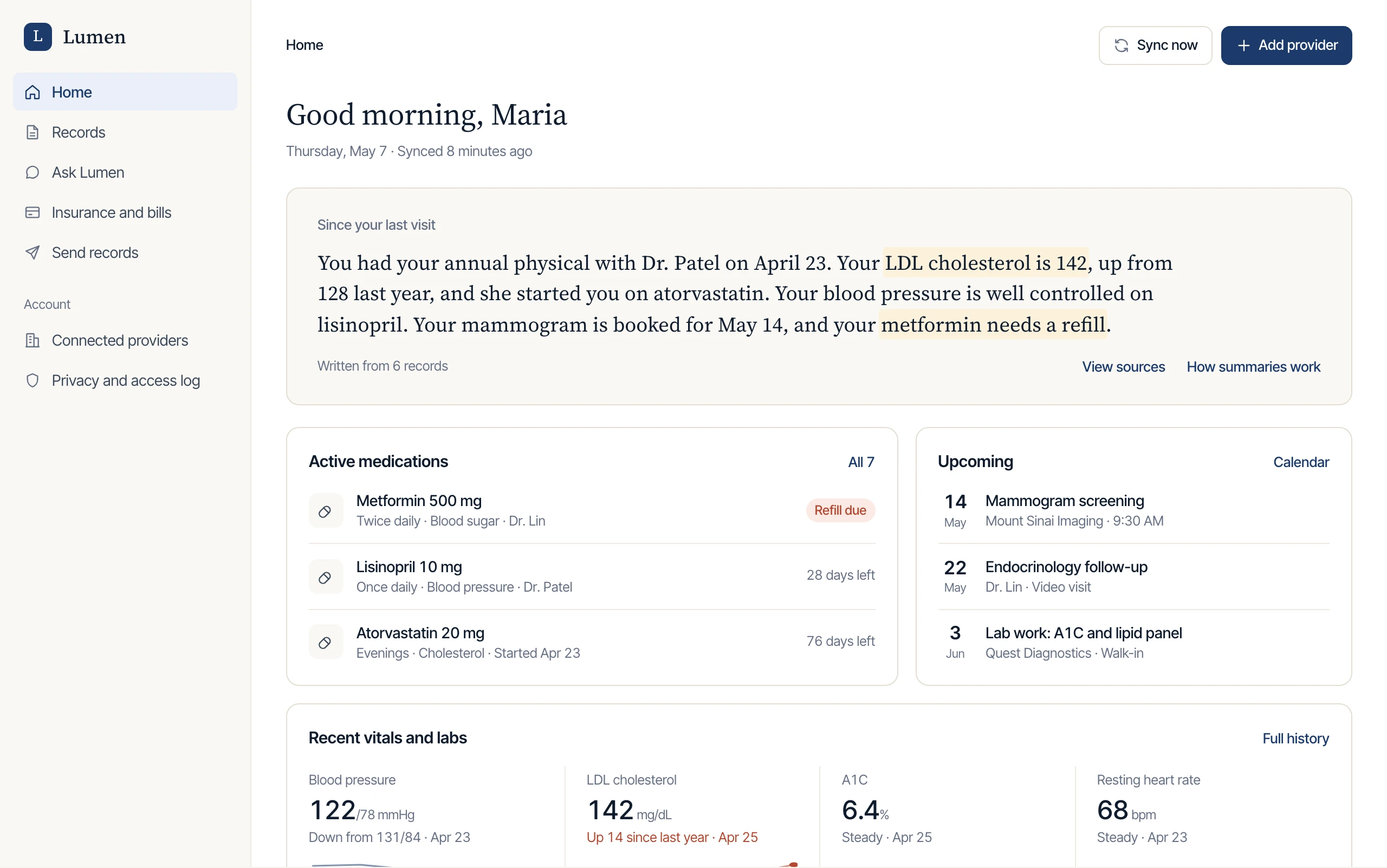
Lumen home screen: a plain-language summary of recent care, active medications, upcoming appointments, and recent vitals.Lumen on a phone: the Ask Lumen chat answering a cholesterol question with cited sources, and declining a question that asks for medical advice.

At a glance

Summary

  • problem
  • approach
  • status
may
quote verbatim
may not
round or extrapolate results
Problem
EHI exports are split across providers and hard for patients to read, and bills arrive separately on paper. Patients end up piecing it all together themselves.
Approach
A patient-owned portal that combines EHI exports from every provider. AI turns clinical reports into readable summaries and answers questions in a chat that cites its sources and gives no medical advice.
Status
Phase 1 brief and static wireframes submitted to the ONC eHignite Challenge.

Context

An entry in the ONC eHignite Challenge

I did Phase 1, a strategic brief plus static wireframes, alone.

Problem

Why EHI exports are hard for patients to use

Every provider exports records separately, in reports written for clinicians, and bills arrive by mail. Patients are left to pull it all together themselves.

  1. Fragmentation

    Every provider exports separately, so there's no single view of a patient's own history.

  2. Illegibility

    Reports are written for clinicians. Most patients can't parse the labs, codes, or shorthand.

  3. Paper trail debt

    Bills arrive late by mail from each provider, uncoordinated, untracked, and with no sign of which are urgent.

Solution

A single portal for every provider's records

eHignite connects to every provider a patient uses and combines their EHI exports into one record. AI summarizes the exports in plain language and answers questions with cited sources.

Lumen home screen: a plain-language summary of recent care, active medications, upcoming appointments, and recent vitals.
Home: the summary comes first, and every line traces to a record.

How it works

How patients move through the product

Patients connect each provider once. Their records are normalized into one record, and everything they read, ask about, or share comes from that record.

How patients move through Lumen
Signs in, consentsRevoke access any timePatientProvider portalsNormalize to FHIROne recordHome summaryRecordsAsk LumenInsuranceSend to a providerAccess log
Inside Ask Lumen
Asks for adviceAbout the recordQuestionScope checkDeclineCare teamOne recordSearch the recordOpen the sourceCite sourcesAnswer

Screens

The product, screen by screen

Seven screens in the order a patient meets them, from connecting providers to sharing records, on desktop and phone.

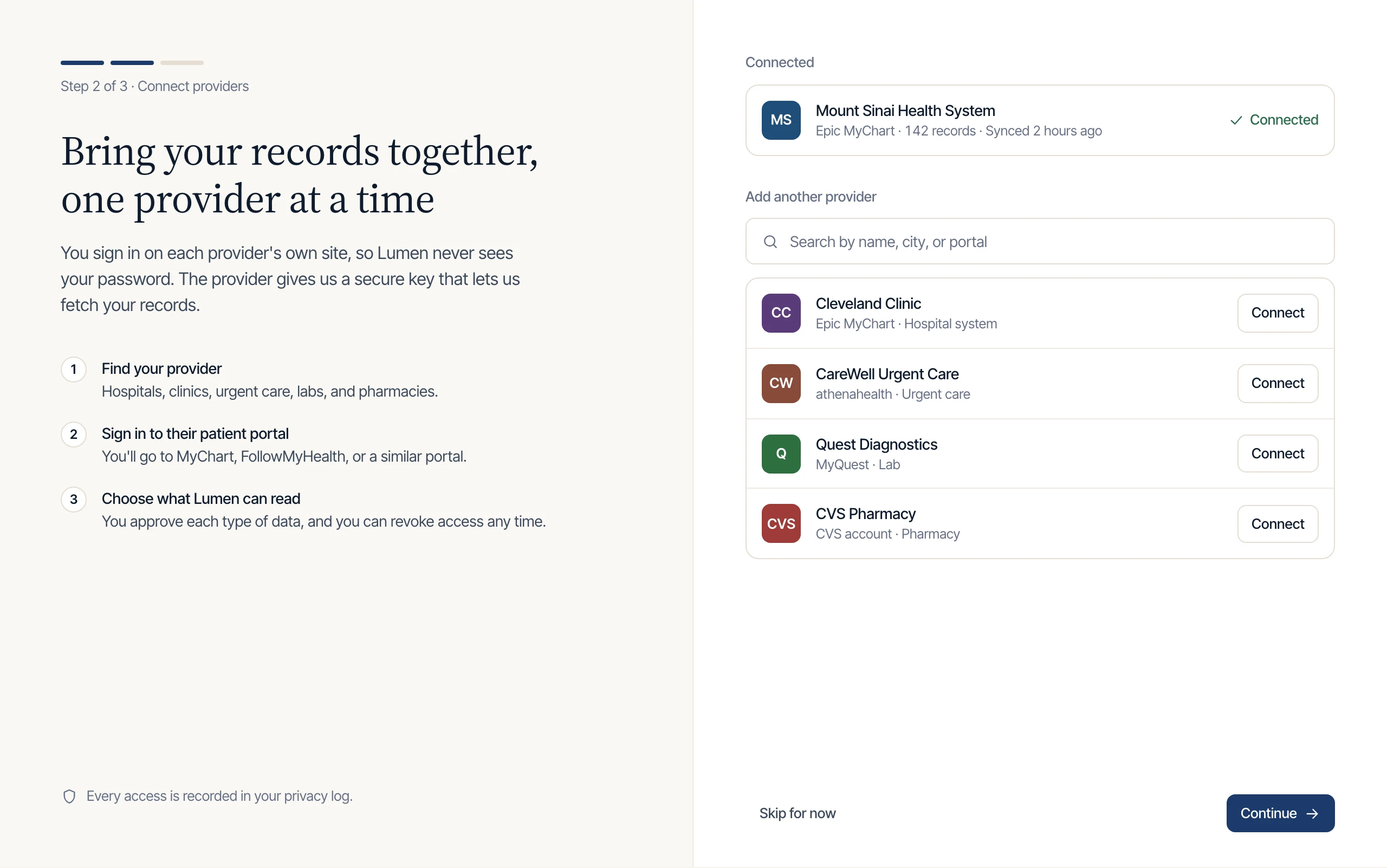
  1. Connect your providers

    Onboarding screen listing a connected health system and providers available to connect.

    Patients sign in at each provider's own portal, so Lumen never sees a password.

  2. Home

    Home dashboard with a summary, medications, upcoming appointments, and vitals with sparklines.

    A plain-language summary leads, with the refill and the high LDL highlighted.

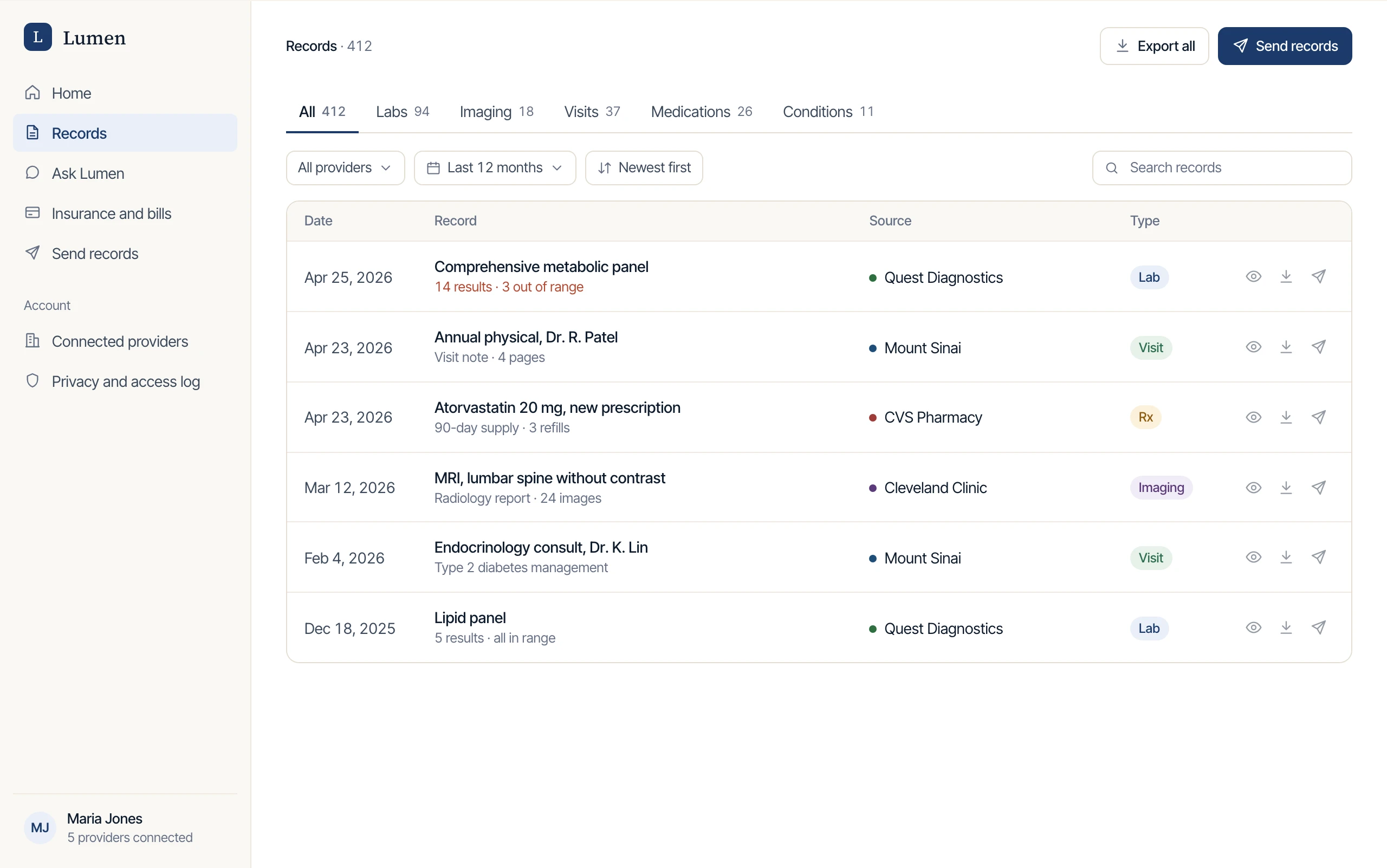
  3. Records

    Records table filtered by type, with labs, visits, prescriptions, and imaging from several providers.

    Every provider's records in one filterable timeline.

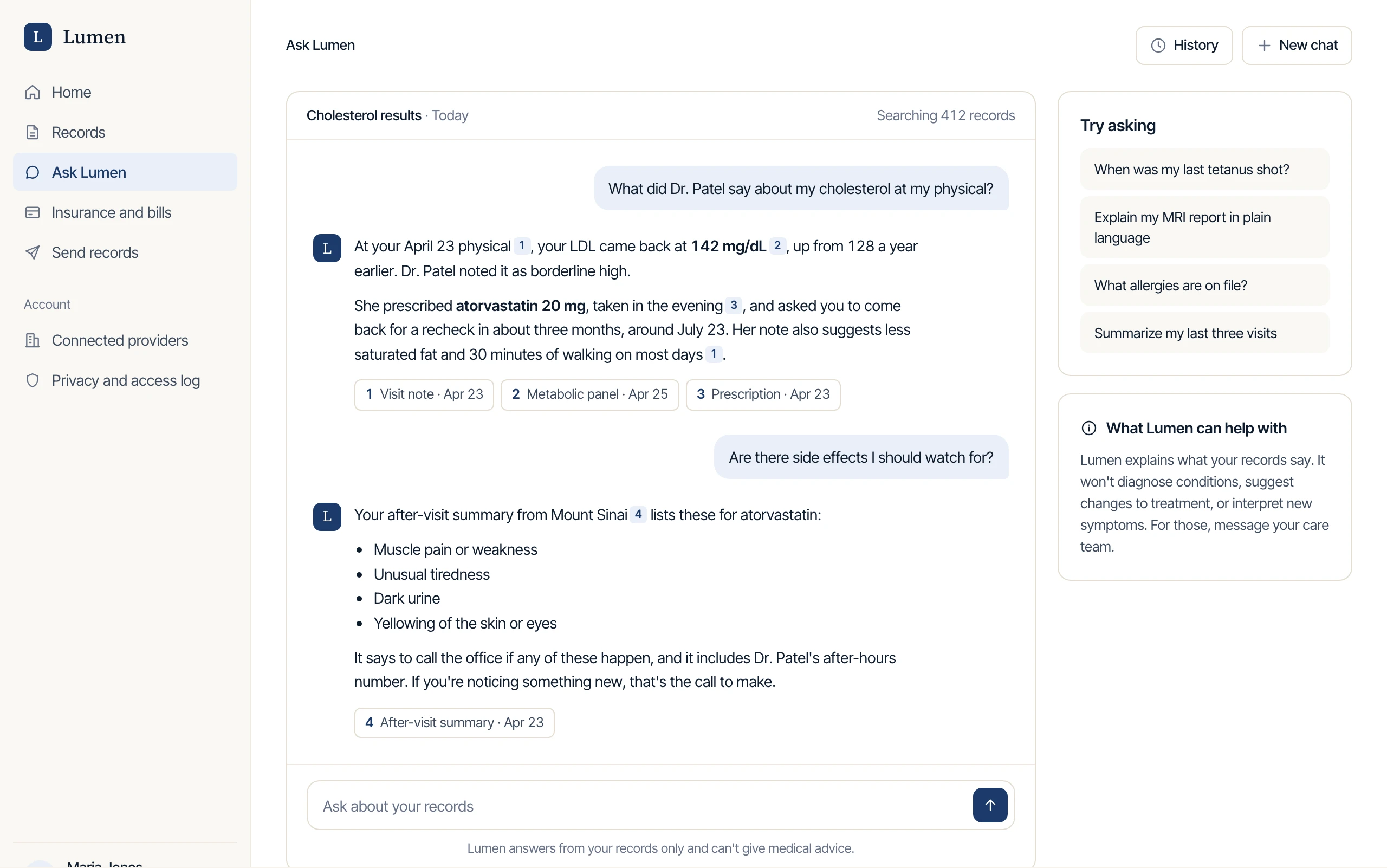
  4. Ask Lumen

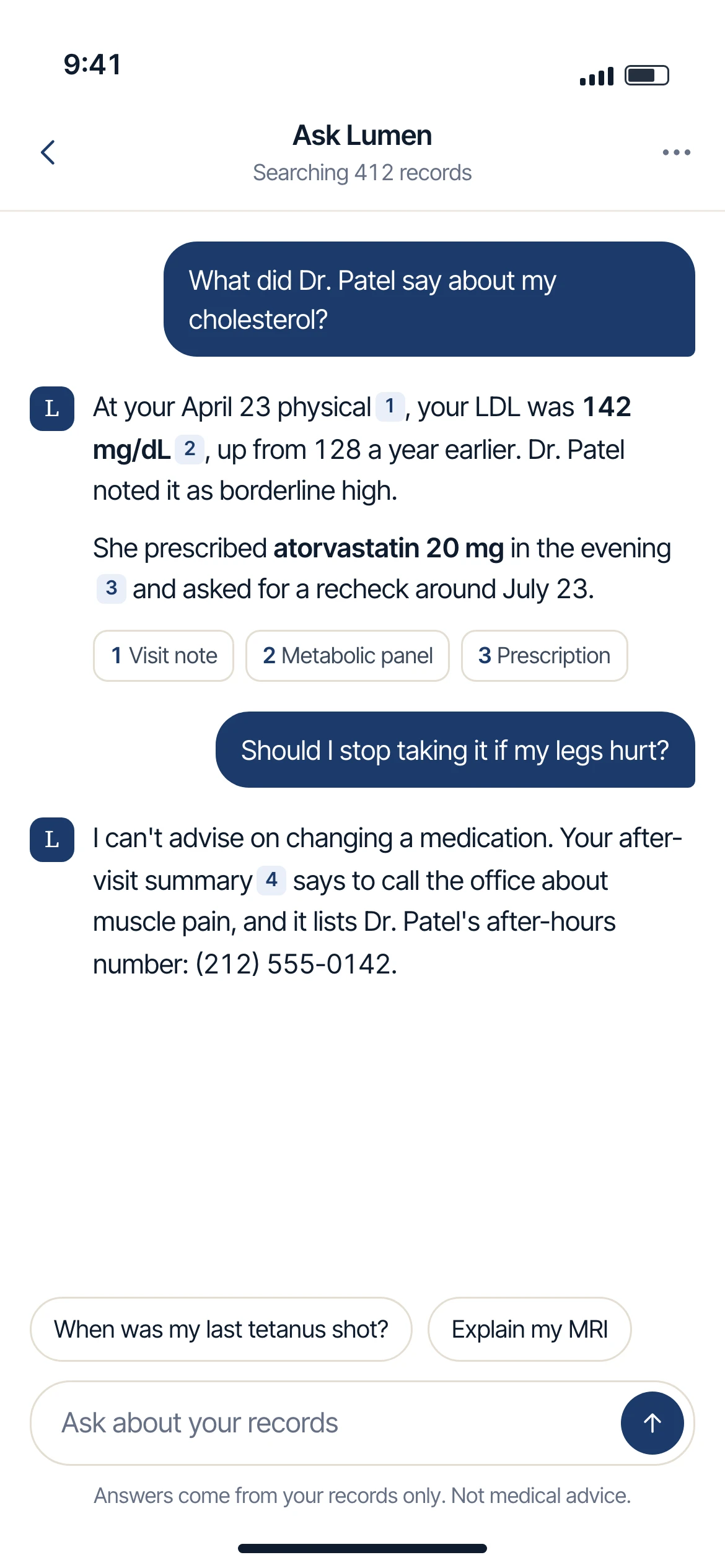
    Chat screen with answers about cholesterol that cite a visit note, a lab panel, and a prescription.

    Every answer lists the records it came from.

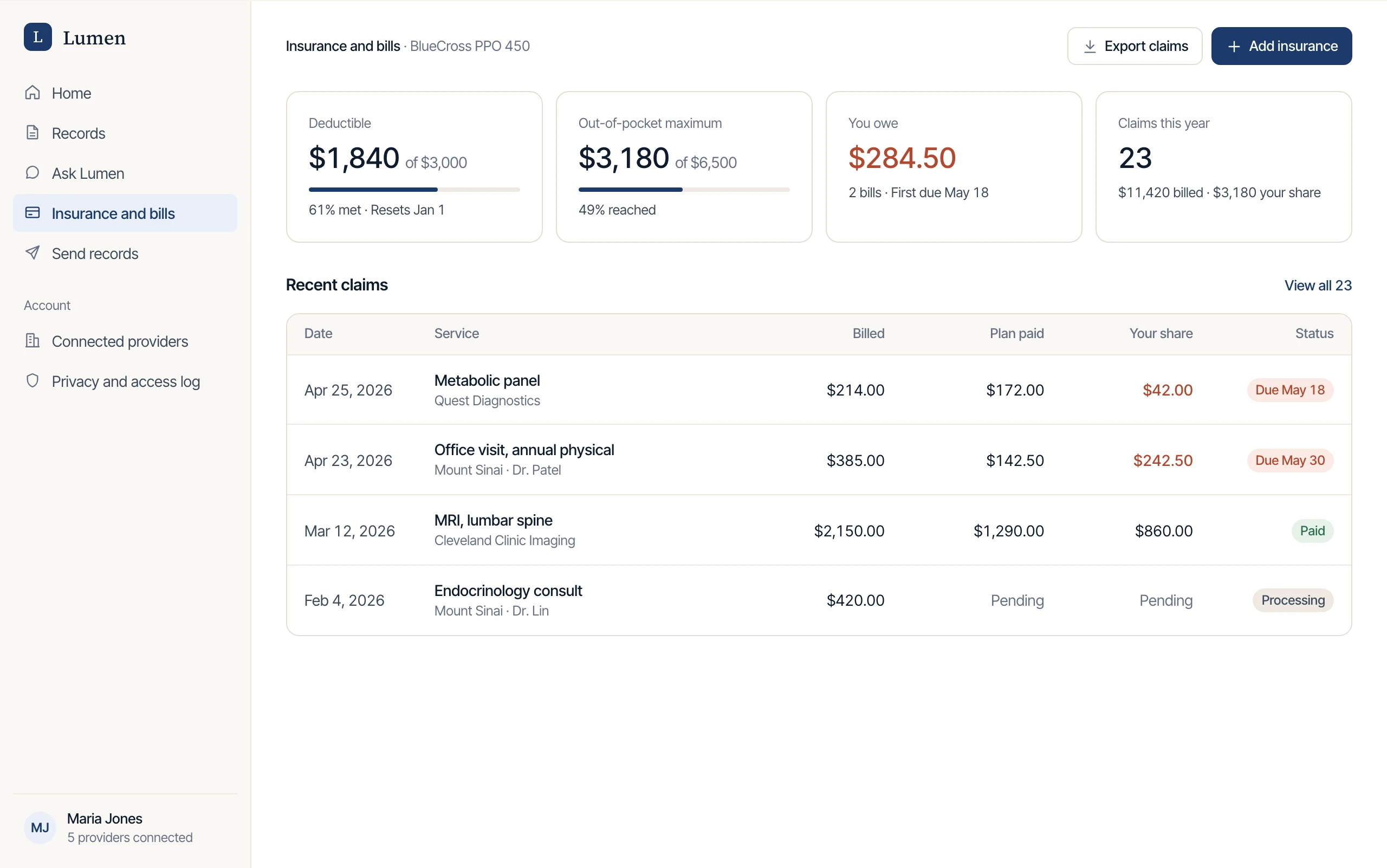
  5. Insurance and bills

    Insurance screen with deductible progress, the amount owed, and a table of recent claims.

    Claims from the CMS Patient Access API, next to the visits they belong to.

  6. Send to a provider

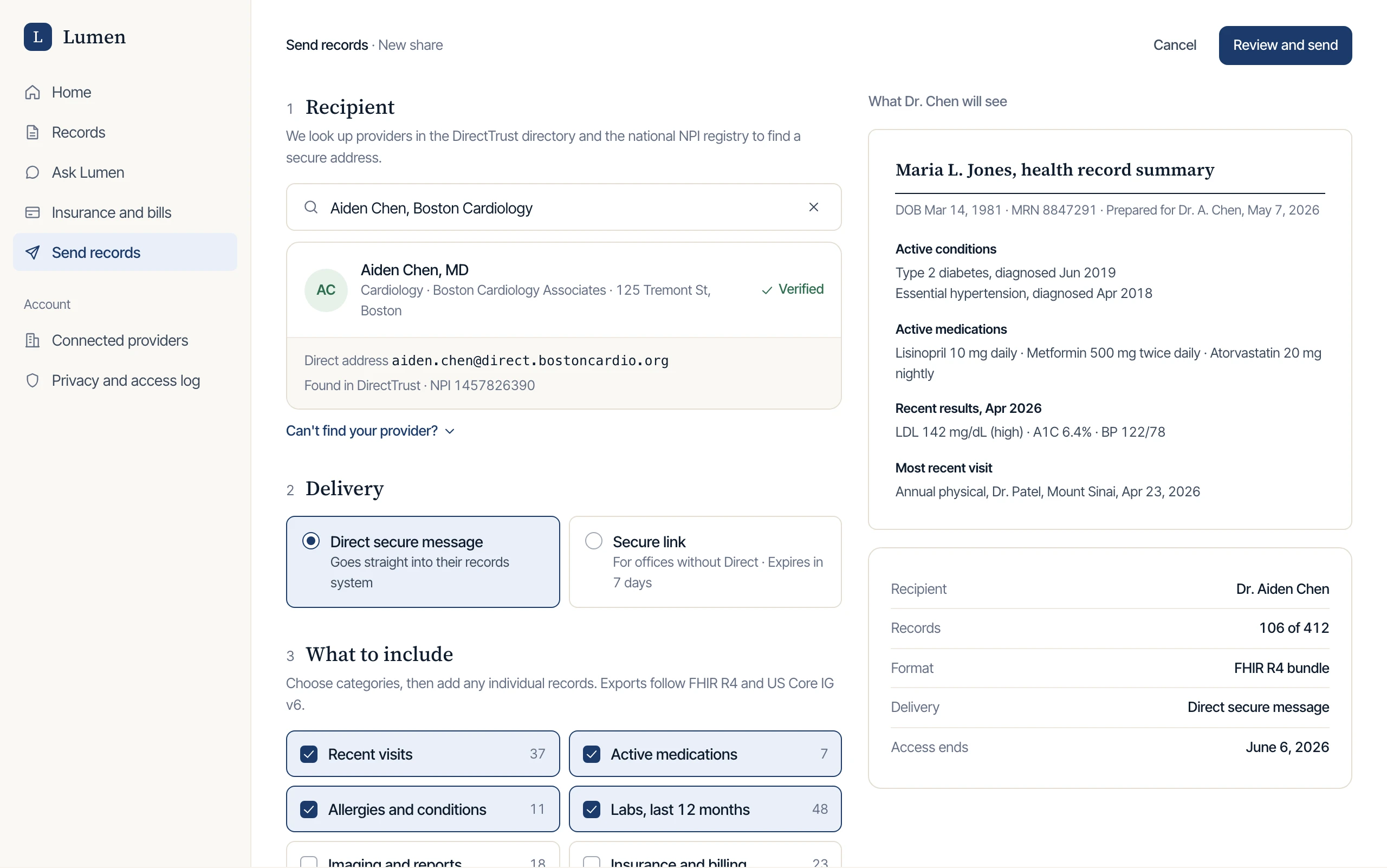
    Sharing flow with a verified recipient, delivery options, record categories, and a preview of the summary.

    A live preview shows exactly what the receiving doctor will see.

  7. On a phone

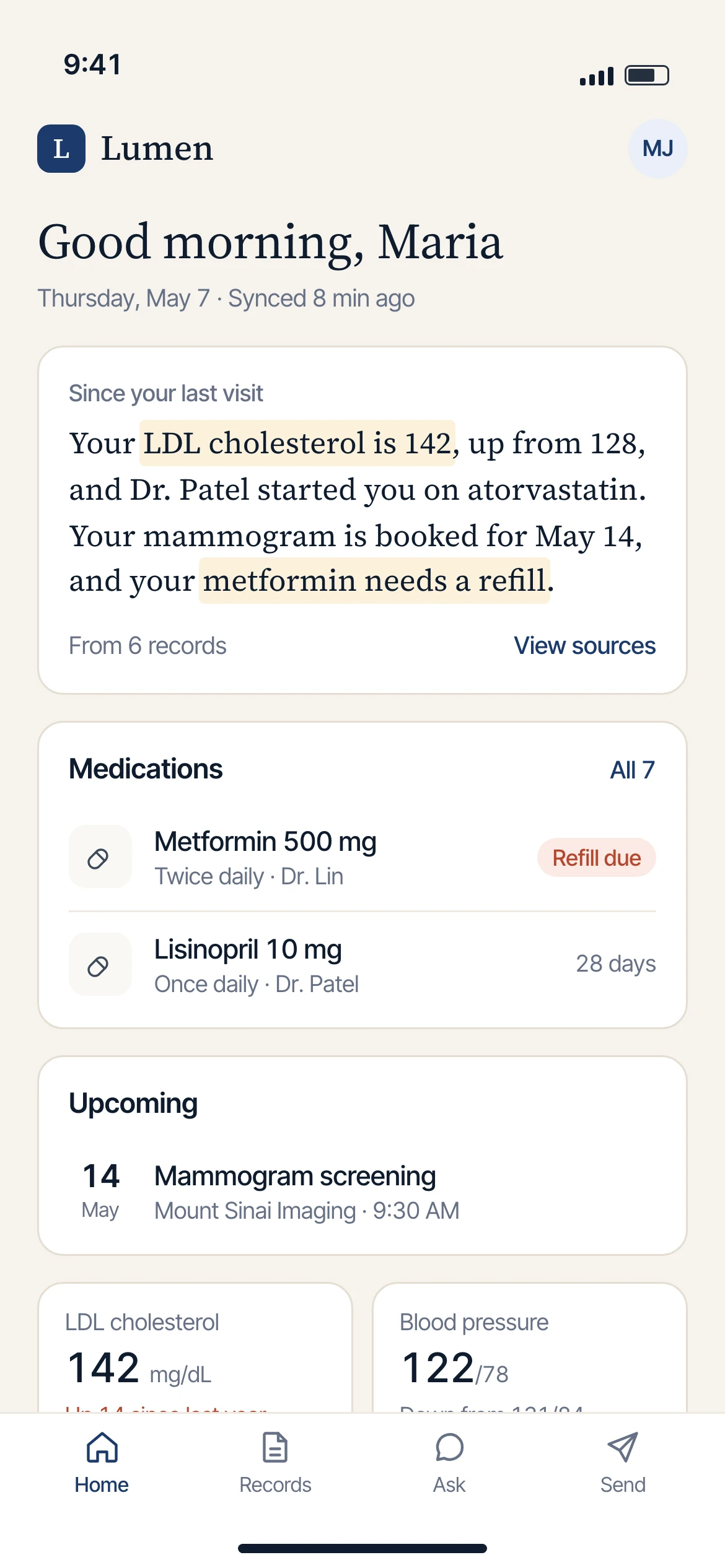
    Lumen home on a phone with the summary, medications, and vitals.Ask Lumen on a phone, answering with cited sources.

    Home and Ask Lumen, the two views patients open most.

1 of 7 · Select a screen to enlarge it

Users

Patients who want to own their healthcare information.

The portal is for patients whose records live in several places. The AI summarizes and cites its sources, and it never gives medical advice.

  • Patients

    Primary. Multiple specialists, chronic conditions to manage, recent care transitions, or a record in three or more places.

    Control over their health information, and a way to understand it.

  • Providers

    Secondary. Receiving information from a new patient.

    A clean, structured handoff through the portability flow instead of faxes or scattered PDFs.

AI orchestration

How the AI layer is structured.

Each export format is mapped into one normalized record. Every chat answer points to the exact line it came from, and questions asking for advice get an explicit refusal.

Ask Lumen answering a cholesterol question, with numbered citations and source chips under each answer.
Ask Lumen: each answer lists the records it came from.

Attachments

Phase 1 brief

The brief covers strategy, problem framing, the technical architecture, the AI approach, and the Phase 2 roadmap.

Live prototype

Interactive demo with sample data. Start as Maria, or open it full screen.Open full screen

Keep reading

Want the details?

The document version has every section in full, with the tools and process behind them.

CaseStudy

  • title
  • summary
  • role
  • status
  • stack
  • sections
may
quote verbatim · summarize · link to sections
may not
invent metrics · speak for past employers · expose gated content

eHignite

A unified patient portal that pulls fragmented EHI exports from every provider into one place, and uses AI to translate clinical reports into plain language patients can read.
Lumen home screen: a plain-language summary of recent care, active medications, upcoming appointments, and recent vitals.Lumen on a phone: the Ask Lumen chat answering a cholesterol question with cited sources, and declining a question that asks for medical advice.

Summary

  • problem
  • approach
  • status
may
quote verbatim
may not
round or extrapolate results

At a glance

Problem
EHI exports are split across providers and hard for patients to read, and bills arrive separately on paper. Patients end up piecing it all together themselves.
Approach
A patient-owned portal that combines EHI exports from every provider. AI turns clinical reports into readable summaries and answers questions in a chat that cites its sources and gives no medical advice.
Status
Phase 1 brief and static wireframes submitted to the ONC eHignite Challenge.

Context

An entry in the ONC eHignite Challenge

Built for the ONC eHignite Challenge, which has prize money attached. Phase 1 was a strategic brief plus static wireframes.

I did Phase 1 alone, covering strategy, problem framing, product design, and the AI-orchestration architecture. The foundation is built on Next.js 16 and React 19.

Problem

Why EHI exports are hard for patients to use

  1. Fragmentation

    Every provider exports separately, so there's no single view of a patient's own history.

  2. Illegibility

    Reports are written for clinicians. Most patients can't parse the labs, codes, or shorthand.

  3. Paper trail debt

    Bills arrive late by mail from each provider, uncoordinated, untracked, and with no sign of which are urgent.

Under the 21st Century Cures Act, providers have to give patients their Electronic Health Information on request. In practice, that means a PDF dump from one provider, a different format from another, a third login at a third portal, and paper bills arriving in the mail.

These three problems compound each other. Patients are left to pull it all together themselves, and most can't.

Solution

A single portal for every provider's records

  1. AI export reader

    Configured for each export format. Returns factual, plain-language summaries without giving advice.

  2. Appointment tracking

    Pulls next-step suggestions from the last visit notes and surfaces them when they're relevant.

  3. Sourced AI chat

    Reads back the actual line from the export. Every answer cites its source, with no medical advice.

  4. Live dashboard

    Vitals from the most recent visit, medications to pick up, prescriptions expiring soon, and bills, all in one place.

  5. One-click portability

    Sends the unified record to a new provider without re-pulling from every old one.

The portal is patient-owned. In the chat, a patient can ask “what did Dr. K say about my blood pressure last visit?” and the system reads back the actual line from the export.

Lumen home screen: a plain-language summary of recent care, active medications, upcoming appointments, and recent vitals.
Home: the summary comes first, and every line traces to a record.

How it works

How patients move through the product

How patients move through Lumen
Signs in, consentsRevoke access any timePatientProvider portalsNormalize to FHIROne recordHome summaryRecordsAsk LumenInsuranceSend to a providerAccess log
Inside Ask Lumen
Asks for adviceAbout the recordQuestionScope checkDeclineCare teamOne recordSearch the recordOpen the sourceCite sourcesAnswer

Onboarding is the only step that asks much of the patient. They sign in once at each provider's own portal, so Lumen never sees a password. After that, records sync in the background.

Every record goes through the same normalization step, so the home summary, the chat, and the sharing flow all read from one record. Two checkpoints guard the flow. Consent can be revoked from the access log at any time, and every chat question passes a scope check that declines requests for medical advice.

Screens

The product, screen by screen

  1. Connect your providers

    Onboarding screen listing a connected health system and providers available to connect.

    Patients sign in at each provider's own portal, so Lumen never sees a password.

  2. Home

    Home dashboard with a summary, medications, upcoming appointments, and vitals with sparklines.

    A plain-language summary leads, with the refill and the high LDL highlighted.

  3. Records

    Records table filtered by type, with labs, visits, prescriptions, and imaging from several providers.

    Every provider's records in one filterable timeline.

  4. Ask Lumen

    Chat screen with answers about cholesterol that cite a visit note, a lab panel, and a prescription.

    Every answer lists the records it came from.

  5. Insurance and bills

    Insurance screen with deductible progress, the amount owed, and a table of recent claims.

    Claims from the CMS Patient Access API, next to the visits they belong to.

  6. Send to a provider

    Sharing flow with a verified recipient, delivery options, record categories, and a preview of the summary.

    A live preview shows exactly what the receiving doctor will see.

  7. On a phone

    Lumen home on a phone with the summary, medications, and vitals.Ask Lumen on a phone, answering with cited sources.

    Home and Ask Lumen, the two views patients open most.

1 of 7 · Select a screen to enlarge it

These are refined versions of the Phase 1 wireframes. They follow one patient and one set of records throughout, so the numbers agree from one screen to the next.

Users

Patients who want to own their healthcare information.

  • Patients

    Primary. Multiple specialists, chronic conditions to manage, recent care transitions, or a record in three or more places.

    Control over their health information, and a way to understand it.

  • Providers

    Secondary. Receiving information from a new patient.

    A clean, structured handoff through the portability flow instead of faxes or scattered PDFs.

The primary users are patients who are tired of acting as the integration layer between their own providers.

The product takes a strict position on AI in healthcare. The AI translates, summarizes, and surfaces information, and cites where it came from. It does not diagnose, prescribe, or advise. Users can only trust the product if that line stays clear.

AI orchestration

How the AI layer is structured.

Each export format

  • Its own schema
  • Its own clinical shorthand
  • Its own document structure

Mapped into

One normalized record

Read from one shape

  • Chat
  • Summaries
  • Dashboard

Every answer cites its source. Every chat answer points to the exact line of the export it came from, and the user can click through to the original. I held the PK/PD engine to the same rule: every claim has to trace back to a source the user can inspect. In a clinical setting, that's what separates “the model said” from “your doctor said.”

Hard boundaries on advice. The AI can read back what a doctor wrote. It cannot interpret what the doctor meant, suggest a different course, or answer “should I…” questions. Those questions get an explicit refusal that points the user back to their provider.

Still to prove. Phase 1 established the orchestration boundary in the design. Holding it in working code, with real export data and real chat patterns, is the next thing to show.

Ask Lumen answering a cholesterol question, with numbered citations and source chips under each answer.
Ask Lumen: each answer lists the records it came from.

Attachments

Phase 1 brief

The Phase 1 brief covers strategy, problem framing, the technical architecture, the AI approach, and the Phase 2 roadmap.

Document

Phase 1 brief ↗

Strategy, problem framing, user research, architecture, and roadmap. 11 pages. Opens in a new tab.

View the full record for this page
{
  "@type": "CaseStudy",
  "id": "03 / ehignite",
  "title": "eHignite",
  "summary": "A unified patient portal that pulls fragmented EHI exports from every provider into one place, and uses AI to translate clinical reports into plain language patients can read.",
  "role": "Lead product designer · Phase 1 solo",
  "status": "Phase 1 submitted",
  "stack": [
    "Next.js 16",
    "React 19",
    "TypeScript",
    "Tailwind v4",
    "AI orchestration",
    "EHI / FHIR export configuration"
  ],
  "tldr": {
    "problem": "EHI exports are split across providers and hard for patients to read, and bills arrive separately on paper. Patients end up piecing it all together themselves.",
    "solution": "A patient-owned portal that combines EHI exports from every provider. AI turns clinical reports into readable summaries and answers questions in a chat that cites its sources and gives no medical advice.",
    "impact": "Phase 1 brief and static wireframes submitted to the ONC eHignite Challenge.",
    "impactLabel": "Status"
  },
  "sections": [
    {
      "label": "Context",
      "title": "An entry in the ONC eHignite Challenge",
      "anchor": "#context"
    },
    {
      "label": "Problem",
      "title": "Why EHI exports are hard for patients to use",
      "anchor": "#problem"
    },
    {
      "label": "Solution",
      "title": "A single portal for every provider's records",
      "anchor": "#solution"
    },
    {
      "label": "How it works",
      "title": "How patients move through the product",
      "anchor": "#flow"
    },
    {
      "label": "Screens",
      "title": "The product, screen by screen",
      "anchor": "#screens"
    },
    {
      "label": "Users",
      "title": "Patients who want to own their healthcare information.",
      "anchor": "#users"
    },
    {
      "label": "AI orchestration",
      "title": "How the AI layer is structured.",
      "anchor": "#ai"
    },
    {
      "label": "Attachments",
      "title": "Phase 1 brief",
      "anchor": "#attachments"
    }
  ],
  "policy": {
    "agentMay": ["quote verbatim", "summarize", "link to sections"],
    "agentMayNot": ["invent metrics", "speak for past employers", "expose gated content"]
  }
}